Should I download VoxCPM2 or try it online?
Find the upstream VoxCPM2 weights, distinguish GitHub from Hugging Face, and save a WAV using the Python package.
Start in the browser to hear VoxCPM2. Run it locally if you need control over files or want to build your own integration. VoxCPM.net is an independent online service, not OpenBMB’s official project website.
Where should I start?
- Listen to existing recordings. Open OpenBMB’s VoxCPM2 sample collection.
- Generate your own short script online. Open Text to Speech and check the current limits and any sign-in prompt.
- Run the model yourself. Follow the Python example below if you can maintain a Python and PyTorch environment.
Our text-to-speech audio guide includes two site-generated clips and the playback/download steps.
Where do I download the code and weights?
The upstream GitHub repository contains the implementation, installation instructions and examples. Downloading its source ZIP does not include the model weights.
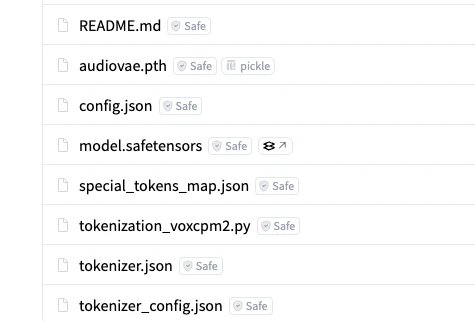
The upstream Hugging Face model files include model.safetensors, audiovae.pth, configuration and tokenizer files. Download the complete model snapshot rather than just one weight file. In Python, VoxCPM.from_pretrained("openbmb/VoxCPM2") downloads that snapshot on first load and uses the local cache afterward. It can also accept a directory containing an already-downloaded snapshot. These behaviors are defined in the upstream loader source.
Use the exact model ID openbmb/VoxCPM2. VoxCPM1.5 and VoxCPM-0.5B are different releases.
How do I generate a WAV with Python?
The upstream quick start recommends Python 3.10–3.12, PyTorch 2.5 or newer, and CUDA 12 or newer for the CUDA setup. Install a PyTorch build appropriate to your GPU and driver first. The model card lists approximately 8 GB VRAM, an estimate rather than a guarantee that every 8 GB GPU or workload fits.
In an activated virtual environment, install the version checked for this article.
python -m pip install 'voxcpm==2.0.3'
Save this as synthesize.py, then run python synthesize.py. First load requires network access for the weights.
import soundfile as sf
from voxcpm import VoxCPM

model = VoxCPM.from_pretrained("openbmb/VoxCPM2", load_denoiser=False)
wav = model.generate(
    text="Hello, this is a short VoxCPM2 speech demo.",
    cfg_value=2.0,
    inference_timesteps=10,
)
sf.write("output.wav", wav, model.tts_model.sample_rate)
This follows the model card’s basic TTS example and needs no reference recording. Keep model.tts_model.sample_rate when saving. VoxCPM2 outputs 48 kHz, unlike the 16 kHz setting in older VoxCPM examples.
If a copied example fails with an unexpected seed argument, remove it when using 2.0.3. The current GitHub README includes that argument, but the published 2.0.3 package does not accept it.
Check the saved file.
python -c 'import soundfile as sf; i = sf.info("output.wav"); print(i); assert i.format == "WAV" and i.frames > 0 and i.samplerate == 48000'
Then listen to the whole file. A readable WAV with the expected sample rate does not prove that every word was spoken correctly.
Do I need a VoxCPM.net account for the Python API?
No. Here, Python API means functions in the installed voxcpm library that run inference in your environment. They need no VoxCPM.net account or API key. A site account is for this site’s tools and does not provide a hosted developer API entitlement.
As of November 15, 2026, we checked the upstream instructions and function arguments in the released package but did not run local inference or benchmark hardware.